Laravel, framework PHP yang populer, menyediakan cara yang elegan dan efisien untuk berinteraksi dengan database melalui Eloquent ORM. Salah satu fitur penting dari Eloquent adalah kemampuan untuk mendefinisikan relationships atau hubungan antar tabel. Dalam artikel ini, kita akan membahas secara mendalam tentang Laravel Eloquent Relationship One to Many (Satu ke Banyak), bagaimana mengimplementasikannya, dan mengapa ini menjadi kunci dalam membangun aplikasi web yang kompleks dan terstruktur dengan Laravel. Mari kita selami lebih dalam!
Apa Itu One to Many Relationship dan Mengapa Penting dalam Laravel?
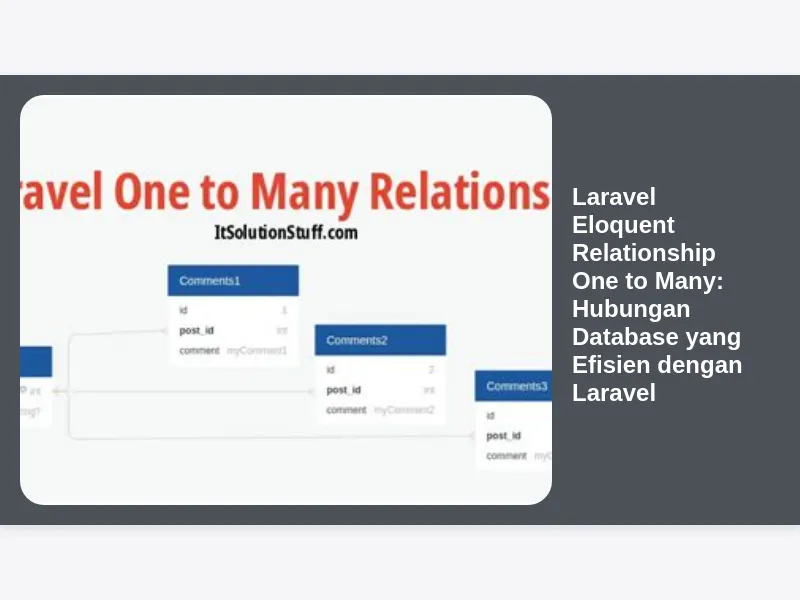
One to Many Relationship (Hubungan Satu ke Banyak) dalam konteks database terjadi ketika satu baris dalam satu tabel terhubung ke banyak baris dalam tabel lain. Bayangkan sebuah contoh sederhana: sebuah Author (penulis) dapat memiliki banyak Posts (artikel). Satu penulis bisa menulis banyak artikel, tetapi setiap artikel hanya ditulis oleh satu penulis. Inilah esensi dari One to Many relationship.
Mengapa ini penting dalam Laravel? Karena memungkinkan kita untuk:
- Menyederhanakan Query Database: Daripada menulis query SQL yang rumit dan panjang, Eloquent mempermudah pengambilan data terkait dengan kode yang lebih bersih dan mudah dibaca.
- Mempertahankan Integritas Data: Dengan mendefinisikan hubungan, kita dapat dengan mudah memastikan bahwa data yang saling terkait tetap konsisten.
- Meningkatkan Produktivitas: Mengurangi waktu yang dibutuhkan untuk menulis kode database, memungkinkan fokus lebih besar pada logika aplikasi.
- Struktur Kode yang Lebih Terorganisir: Kode menjadi lebih modular dan mudah dikelola.
Membuat Migrasi Database untuk One to Many Relationship
Sebelum kita masuk ke kode Eloquent, kita perlu menyiapkan struktur database kita. Mari kita buat migrasi untuk tabel authors (penulis) dan posts (artikel).
1. Membuat Migrasi untuk Tabel authors:
Buka terminal dan jalankan perintah berikut:
php artisan make:migration create_authors_table --create=authorsIni akan membuat file migrasi baru di direktori database/migrations. Buka file tersebut dan modifikasi:
<?php

use IlluminateDatabaseMigrationsMigration;
use IlluminateDatabaseSchemaBlueprint;
use IlluminateSupportFacadesSchema;

class CreateAuthorsTable extends Migration
{
    /**
     * Run the migrations.
     *
     * @return void
     */
    public function up()
    {
        Schema::create('authors', function (Blueprint $table) {
            $table->id();
            $table->string('name');
            $table->string('email')->unique();
            $table->timestamps();
        });
    }

    /**
     * Reverse the migrations.
     *
     * @return void
     */
    public function down()
    {
        Schema::dropIfExists('authors');
    }
}
2. Membuat Migrasi untuk Tabel posts:
Jalankan perintah berikut:
php artisan make:migration create_posts_table --create=postsBuka file migrasi yang baru dibuat dan modifikasi:
<?php

use IlluminateDatabaseMigrationsMigration;
use IlluminateDatabaseSchemaBlueprint;
use IlluminateSupportFacadesSchema;

class CreatePostsTable extends Migration
{
    /**
     * Run the migrations.
     *
     * @return void
     */
    public function up()
    {
        Schema::create('posts', function (Blueprint $table) {
            $table->id();
            $table->string('title');
            $table->text('body');
            $table->foreignId('author_id')->constrained()->onDelete('cascade'); // Foreign key ke tabel authors
            $table->timestamps();
        });
    }

    /**
     * Reverse the migrations.
     *
     * @return void
     */
    public function down()
    {
        Schema::dropIfExists('posts');
    }
}
Penjelasan:
$table->foreignId('author_id')->constrained()->onDelete('cascade');: Ini adalah bagian penting yang mendefinisikan foreign key.author_idadalah nama kolom yang akan menyimpan ID penulis.constrained()menambahkan batasan foreign key yang merujuk ke tabelauthorsdan kolomid.onDelete('cascade')memastikan bahwa jika seorang penulis dihapus, semua artikel yang terkait dengan penulis tersebut juga akan dihapus (cascade delete). Ini penting untuk menjaga integritas data.
3. Menjalankan Migrasi:
Setelah migrasi selesai, jalankan perintah berikut untuk membuat tabel di database Anda:
php artisan migrateMendefinisikan One to Many Relationship di Model Eloquent
Sekarang kita memiliki struktur database, kita perlu mendefinisikan hubungan One to Many di model Eloquent kita.
1. Membuat Model Author:
php artisan make:model AuthorBuka app/Models/Author.php dan tambahkan kode berikut:
<?php

namespace AppModels;

use IlluminateDatabaseEloquentFactoriesHasFactory;
use IlluminateDatabaseEloquentModel;

class Author extends Model
{
    use HasFactory;

    protected $fillable = ['name', 'email'];

    /**
     * Mendefinisikan relationship "one to many" dengan Post.
     */
    public function posts()
    {
        return $this->hasMany(Post::class);
    }
}
Penjelasan:
$this->hasMany(Post::class)mendefinisikan bahwa sebuahAuthormemiliki banyakPost. MetodehasMany()secara otomatis akan mencari kolomauthor_iddi tabelpostsuntuk membangun hubungan.
2. Membuat Model Post:
php artisan make:model PostBuka app/Models/Post.php dan tambahkan kode berikut:
<?php

namespace AppModels;

use IlluminateDatabaseEloquentFactoriesHasFactory;
use IlluminateDatabaseEloquentModel;

class Post extends Model
{
    use HasFactory;

    protected $fillable = ['title', 'body', 'author_id'];

    /**
     * Mendefinisikan relationship "belongs to" dengan Author.
     */
    public function author()
    {
        return $this->belongsTo(Author::class);
    }
}
Penjelasan:
$this->belongsTo(Author::class)mendefinisikan bahwa sebuahPostdimiliki oleh seorangAuthor. MetodebelongsTo()secara otomatis akan mencari kolomauthor_iddi tabelpostsdan mencocokkannya dengan kolomiddi tabelauthors.
Menggunakan One to Many Relationship untuk Mengambil Data
Setelah kita mendefinisikan relationship, mari kita lihat bagaimana cara menggunakannya untuk mengambil data terkait.
1. Mengambil Semua Posts dari Seorang Author:
$author = Author::find(1); // Misalkan kita ingin mengambil author dengan ID 1

// Mengambil semua posts yang terkait dengan author ini
$posts = $author->posts;

foreach ($posts as $post) {
    echo $post->title . "<br>";
}
Kode ini sangat sederhana! Eloquent secara otomatis akan menjalankan query database yang diperlukan untuk mengambil semua posts yang memiliki author_id yang sama dengan ID author.
2. Mengambil Author dari Sebuah Post:
$post = Post::find(1); // Misalkan kita ingin mengambil post dengan ID 1

// Mengambil author yang menulis post ini
$author = $post->author;

echo $author->name;
Sekali lagi, Eloquent melakukan semua pekerjaan berat untuk kita. Kita hanya perlu mengakses properti author dari objek Post untuk mendapatkan data author terkait.
Eager Loading: Meningkatkan Performa Query
Secara default, Eloquent menggunakan lazy loading, yang berarti bahwa data relationship hanya diambil ketika kita mengaksesnya. Ini bisa menyebabkan masalah performa jika kita perlu mengakses relationship untuk banyak objek. Solusinya adalah menggunakan eager loading.
Contoh Eager Loading:
$authors = Author::with('posts')->get();

foreach ($authors as $author) {
    echo $author->name . "<br>";
    foreach ($author->posts as $post) {
        echo "- " . $post->title . "<br>";
    }
}
Penjelasan:
Author::with('posts')memberitahu Eloquent untuk mengambil datapostsbersamaan dengan dataauthorsdalam satu query database. Ini menghindari masalah N+1 query, di mana satu query dijalankan untuk mengambil authors, dan kemudian N query dijalankan untuk mengambil posts untuk setiap author.
Eager loading sangat penting untuk meningkatkan performa aplikasi Anda, terutama ketika berurusan dengan banyak data.
Menyimpan dan Memperbarui Data dengan One to Many Relationship
Eloquent juga mempermudah penyimpanan dan pembaruan data yang terkait dengan One to Many relationship.
1. Membuat Post Baru untuk Seorang Author:
$author = Author::find(1);

$post = new Post([
    'title' => 'Judul Artikel Baru',
    'body' => 'Isi artikel baru...',
]);

$author->posts()->save($post);
Penjelasan:
$author->posts()->save($post)secara otomatis akan mengaturauthor_idpada$postke ID$authorsebelum menyimpan post ke database.
2. Membuat Post Baru Menggunakan create:
$author = Author::find(1);

$post = $author->posts()->create([
    'title' => 'Judul Artikel Baru Lagi',
    'body' => 'Isi artikel baru lainnya...',
]);
Metode create bekerja mirip dengan save tetapi langsung membuat instance model dan menyimpannya ke database. Pastikan Anda telah mendefinisikan $fillable properti di model Post Anda.
3. Menghapus Post dari Seorang Author:
Anda bisa menggunakan metode delete secara langsung pada model Post, atau jika Anda menggunakan onDelete('cascade') dalam migrasi Anda, menghapus author akan secara otomatis menghapus semua post terkait.
Menggunakan Query Constraints dengan Relationships
Terkadang, Anda mungkin perlu menambahkan batasan (constraints) pada query saat mengambil data melalui relationship. Eloquent menyediakan cara yang mudah untuk melakukannya.
Contoh:
$author = Author::find(1);

$posts = $author->posts()->where('title', 'like', '%Laravel%')->get();

foreach ($posts as $post) {
    echo $post->title . "<br>";
}
Kode ini akan mengambil hanya posts dari author dengan ID 1 yang judulnya mengandung kata “Laravel”.
Anda juga bisa menggunakan query constraints dengan eager loading:
$authors = Author::with(['posts' => function ($query) {
    $query->where('title', 'like', '%Laravel%');
}])->get();

foreach ($authors as $author) {
    echo $author->name . "<br>";
    foreach ($author->posts as $post) {
        echo "- " . $post->title . "<br>";
    }
}
Tips dan Trik Optimasi One to Many Relationship di Laravel
Berikut beberapa tips dan trik untuk mengoptimalkan penggunaan One to Many relationship di Laravel:
-
Selalu Gunakan Eager Loading: Seperti yang sudah dijelaskan, eager loading sangat penting untuk menghindari masalah performa.
-
Gunakan
withCount(): Jika Anda hanya perlu menghitung jumlah posts untuk setiap author, gunakan metodewithCount('posts')alih-alih mengambil semua posts. Ini jauh lebih efisien.$authors = Author::withCount('posts')->get(); foreach ($authors as $author) { echo $author->name . " memiliki " . $author->posts_count . " posts.<br>"; } -
Indexing: Pastikan Anda memiliki indeks pada kolom
author_iddi tabelpostsuntuk mempercepat query. -
Cache: Pertimbangkan untuk menggunakan caching untuk data yang jarang berubah.
-
Pilih Kolom yang Dibutuhkan: Saat menggunakan eager loading, Anda bisa memilih hanya kolom yang Anda butuhkan untuk mengurangi jumlah data yang diambil.
$authors = Author::with(['posts:id,title,author_id'])->get();Kode diatas akan hanya mengambil kolom
id,title, danauthor_iddari tabelposts.
Studi Kasus: Penerapan One to Many Relationship pada Aplikasi Blog
Mari kita lihat contoh nyata penerapan One to Many relationship pada aplikasi blog. Selain Author dan Post, kita juga bisa menambahkan model Comment (Komentar). Satu Post bisa memiliki banyak komentar.
1. Migrasi Tabel comments:
php artisan make:migration create_comments_table --create=comments<?php
use IlluminateDatabaseMigrationsMigration;
use IlluminateDatabaseSchemaBlueprint;
use IlluminateSupportFacadesSchema;
class CreateCommentsTable extends Migration
{
/**
* Run the migrations.
*
* @return void
*/
public function up()
{
Schema::create('comments', function (Blueprint $table) {
$table->id();
$table->text('body');
$table->foreignId('post_id')->constrained()->onDelete('cascade');
$table->timestamps();
});
}
/**
* Reverse the migrations.
*
* @return void
*/
public function down()
{
Schema::dropIfExists('comments');
}
}2. Model Comment:
php artisan make:model Comment<?php
namespace AppModels;
use IlluminateDatabaseEloquentFactoriesHasFactory;
use IlluminateDatabaseEloquentModel;
class Comment extends Model
{
use HasFactory;
protected $fillable = ['body', 'post_id'];
public function post()
{
return $this->belongsTo(Post::class);
}
}3. Modifikasi Model Post:
<?php

namespace AppModels;

use IlluminateDatabaseEloquentFactoriesHasFactory;
use IlluminateDatabaseEloquentModel;

class Post extends Model
{
    use HasFactory;

    protected $fillable = ['title', 'body', 'author_id'];

    /**
     * Mendefinisikan relationship "belongs to" dengan Author.
     */
    public function author()
    {
        return $this->belongsTo(Author::class);
    }

    public function comments()
    {
        return $this->hasMany(Comment::class);
    }
}
Sekarang, kita bisa mengambil semua komentar untuk sebuah post dengan mudah:
$post = Post::find(1);
$comments = $post->comments;

foreach ($comments as $comment) {
    echo $comment->body . "<br>";
}
Kesimpulan: Eloquent One to Many Relationship, Senjata Ampuh Developer Laravel
Laravel Eloquent Relationship One to Many adalah fitur yang sangat powerful yang membantu Anda membangun aplikasi web yang kompleks dengan lebih efisien dan terstruktur. Dengan memahami konsep dan implementasinya, Anda dapat menyederhanakan query database Anda, meningkatkan performa aplikasi, dan membuat kode yang lebih mudah dikelola. Jangan ragu untuk bereksperimen dan menjelajahi lebih jauh potensi dari Eloquent relationships dalam proyek-proyek Laravel Anda. Selamat mencoba!